Checkups & medications
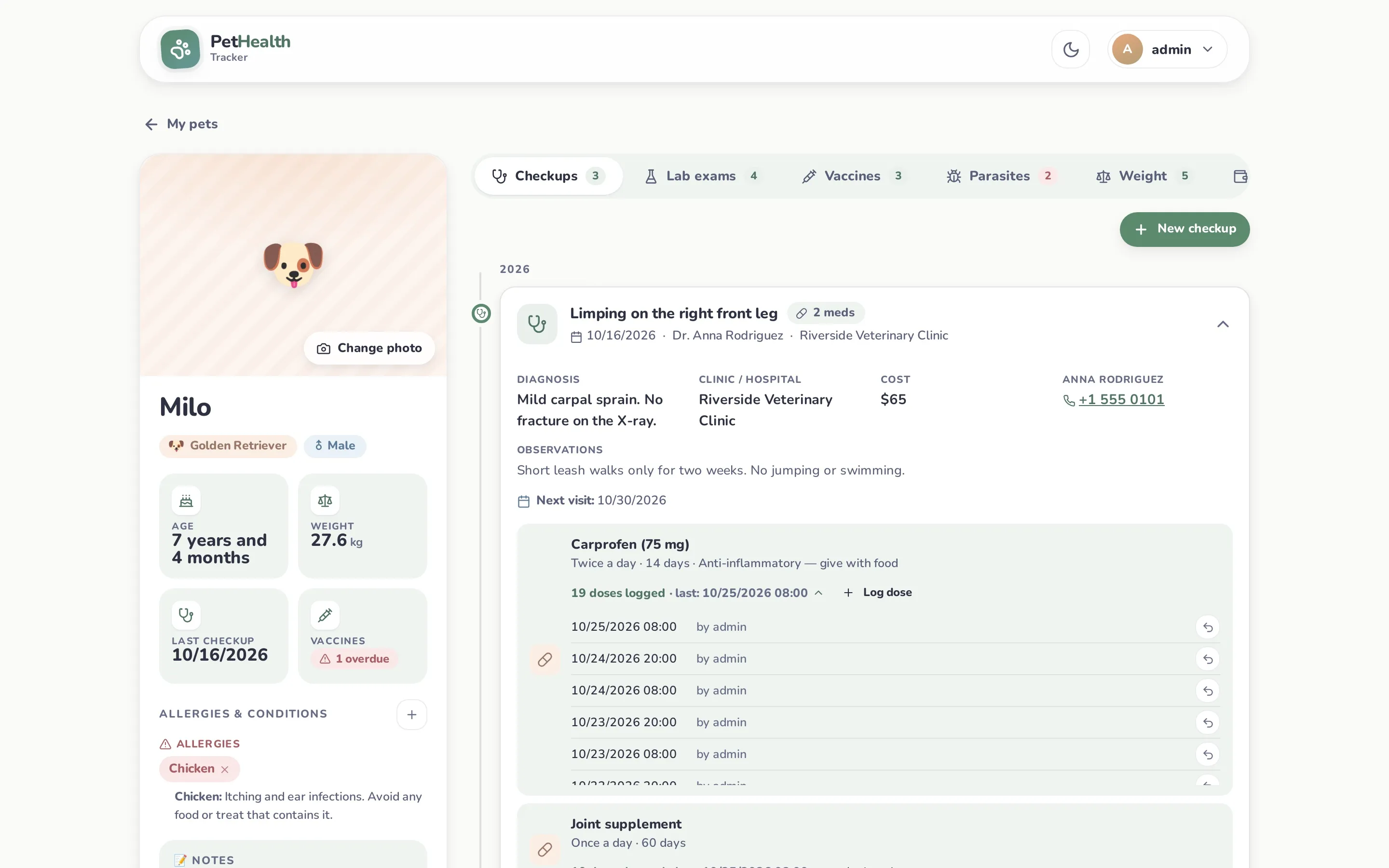
Log a checkup
Section titled “Log a checkup”Profile → Checkups → New checkup.
- The visit: date, reason (required), veterinarian (required), clinic and an optional cost. The veterinarian field suggests names from your vet directory. Picking one fills in the clinic. The app shows “Dr.” before the name, so type just the name.
- Findings: diagnosis, observations and the next visit date. The next visit of the most recent checkup is what shows up in reminders.
- Prescribed medications: add as many as needed, each with name, concentration (e.g. 250 mg), frequency, number of days and notes.
The frequency field offers common values (Once a day, Twice a day, Every 8 hours, Weekly, Monthly, As directed), and you can type anything else.
View, edit and attach files
Section titled “View, edit and attach files”Checkups are listed newest first and grouped by year. Click one to expand it and see the diagnosis, clinic, cost, observations, next visit and medications. If the vet is in your directory with a phone number, it’s shown as a tap-to-call link.
- Edit: change any field and add, edit or remove medications.
- Attach file: up to 3 attachments per checkup (PDF or image, max 10 MB each), e.g. invoices, prescriptions or photos.
- Delete checkup: removes it with its medications, doses and attachments.
When is a medication “active”?
Section titled “When is a medication “active”?”A medication with a number of days is active from the checkup date through its last day. For example, a checkup on May 1 with 14 days runs until May 14. Active medications appear in Active treatments on the dashboard and in the calendar feed. Medications without a duration are kept in the record but never show as active.
Dose tracking
Section titled “Dose tracking”Each medication shows how many doses have been logged and the last one, e.g. 19 doses logged · last: 10/25/2026 08:00.
- Log dose (in the checkup) or the dose button on the dashboard records a dose now, with your username.
- Click the dose count to open the dose history (date, time, who). Use the ↶ button to undo a dose logged by mistake.
- The daily target on the dashboard is worked out from the frequency text, in English or Spanish:
| Frequency text | Doses per day |
|---|---|
| Once a day · Daily · Every 24 hours | 1 |
| Twice a day · Every 12 hours | 2 |
| Every 8 hours · Three times a day | 3 |
| Every 6 hours | 4 |
| Weekly · Monthly · One-time · As directed | no daily target |
Editors and owners can log and undo doses; viewers can only see them.