Dashboard
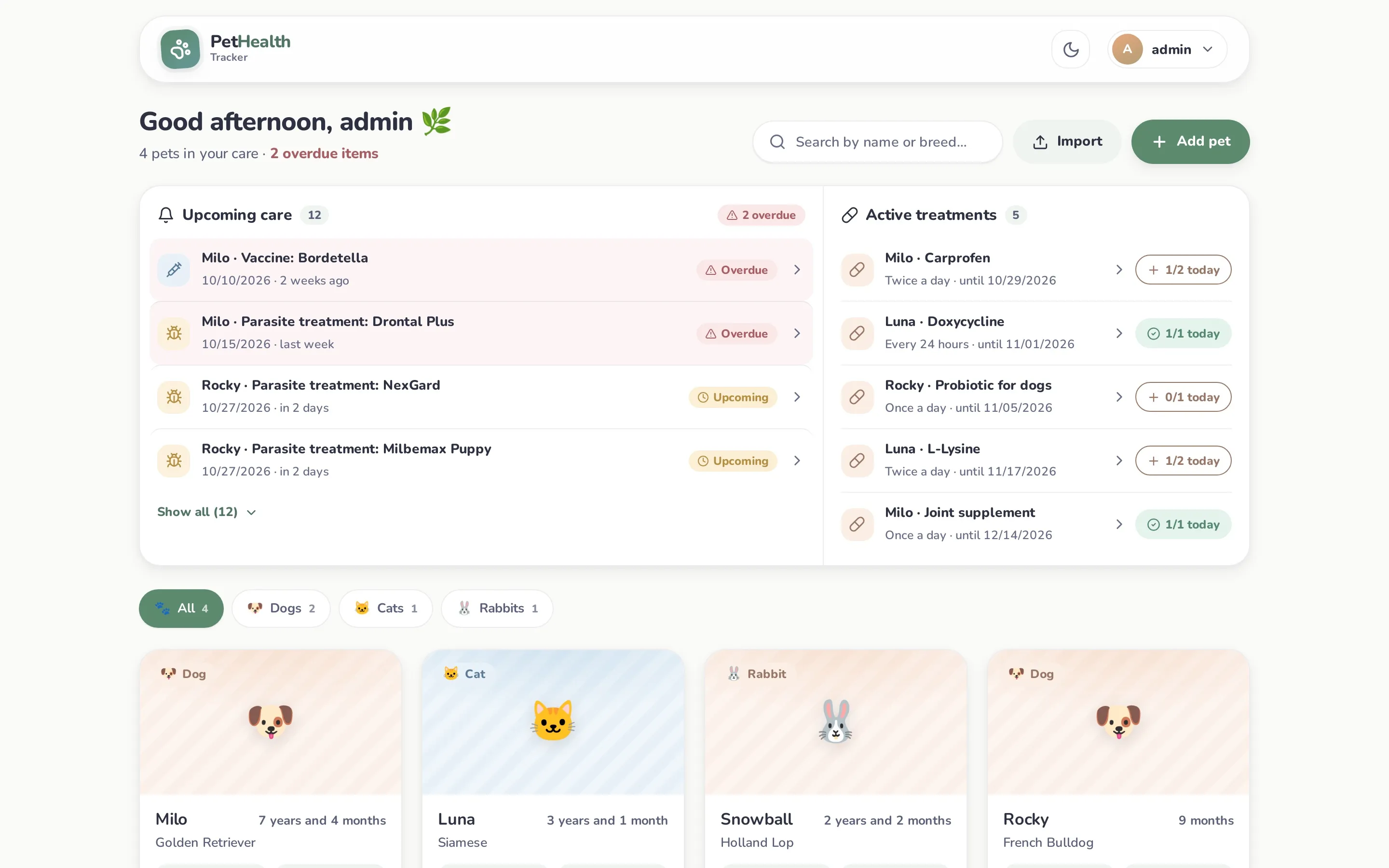
The dashboard (My pets) is the home screen. From top to bottom:
Header
Section titled “Header”A greeting, the number of pets in your care and how many items are overdue. Next to it are the search box (by name or breed), Import (a pet ZIP, see Reports & export) and Add pet.
Upcoming care
Section titled “Upcoming care”Everything that’s overdue, plus everything due in the next 30 days, for all the pets you own or that are shared with you, sorted by date:
| Type | Where it comes from |
|---|---|
| Visit | The next visit date of each pet’s most recent checkup. Logging a newer checkup replaces the old date. |
| Vaccine | The next booster of the latest dose of each vaccine (matched by name). |
| Parasite treatment | The next dose of the latest treatment of each type (internal / external / combined). |
Overdue items are shown in red with an Overdue pill; the rest show Upcoming. The list shows the first four items; use Show all to expand it. Click an item to open that pet on the right tab.
Active treatments
Section titled “Active treatments”Every medication with a duration that’s running today (from the checkup date until its last day), with its frequency and end date.
The button on the right is the dose tracker:
- It shows today’s progress, e.g. 1/2 today. The target comes from the prescription’s frequency: “Every 8 hours” → 3, “Twice a day” → 2, “Once a day”/“Every 24 hours” → 1. Weekly, monthly or “as directed” have no target, so it just shows how many doses were given today.
- Click it to log a dose now, recorded with the current time and your name.
- When all of today’s doses are done it turns green (✓ 2/2 today). Clicking again asks for confirmation before logging an extra dose.
- Hover over it on a computer to see today’s times and who gave them.
- People with view-only access see the progress but can’t log doses.
To undo a dose, open the checkup and use the dose history. See Checkups & medications.
Pet cards
Section titled “Pet cards”One card per pet with photo (or species emoji), age, current weight, last checkup and its most urgent reminder. Filter by species with the chips above the cards. Shared pets are listed after your own.